Port Scan
Perform a basic port scan using nmap to a remote host
# Scan a host with a range of ports. 1-100 is the ports to scan, 111.111.111.111 is the IP address
nmap -p 1-100 111.111.111.111

# If the above doesn't run as filtering is happening
nmap -P0 -p 1-100 111.111.111.111
Perform a ping scan for a number of IP address. This will scan a block of IP address and let you know if they respond to pings
# Scan an IP address range (192.168.1.1 to 192.168.1.254)
nmap -sP 192.168.1.1-254

# Scan an IP address block
nmap -sP 192.168.1.0/24 (192.168.1.0 to 192.168.1.254)

# Without DNS resolution
nmap -sPn 192.168.1.0/24
Perform a UDP only scan
# Scan a range or ports
nmap -sU -v 111.111.111.111

# Scan if filtering is happening
nmap -P0 -sU -v 111.111.111.111

# Scan specific ports, in this example we are scanning 5060-5070
nmap -P0 -sU -v -p 5060-5070 111.111.111.111
Using Scripts
You can use scripts with NMAP to test the services on a particular port
SNMP Example - test an address block of 192.168.1.0 to 192.168.1.254 for SNMP service
# Create a list of communities to scan for (just adding public and private in this example)
echo "public" >> snmpcommunities.lst
echo "private" >> snmpcommunities.lst

# Run the script
nmap -sU -p161 --script snmp-brute 192.168.1.0/24 --script-args snmp-brute.communitiesdb=./snmpcommunities.lst
# Results - port open and valid for 192.168.1.22
Nmap scan report for 192.168.1.22
Host is up (0.0016s latency).
PORT    STATE SERVICE
161/udp open  snmp
| snmp-brute:
|_  public - Valid credentials

Nmap scan report for 192.168.1.23
Host is up (0.0049s latency).
PORT    STATE         SERVICE
161/udp open|filtered snmp
You can export to an XML by adding the following switch
-oX nmap-result.xml
Run an SNMP walk to find out more details about the SNMP community
snmpwalk -v1 -c public 192.168.1.22
SSL NMAP
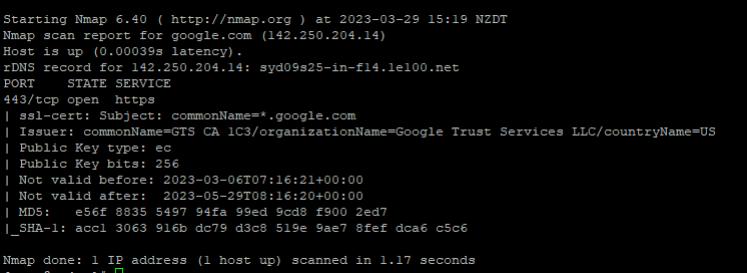
nmap -p 443 --script ssl-cert www.domain.com