We had an issue where we couldn't remove admin users from the Unify portal once they had left the company. Because there were a large number of sites, we would usually have had to go through each site and remove manually before being able to finally delete the user.
We found a script that will automate this process. The files and instructions are below. As always, we recommended opening the script in an editor and understand what it is doing before running, especially in a production enviroment.
There are two downloads below;
Unifi_Super_Admin_remover.ps1: This will only display super admins to be removed.
Unifi_User_remover.ps1: This displays all users, some that don't have super admin rights.
As this script isn't signed, to run, you need to set the execution policy to Unrestricted, and you should revert it back once done.
Open PowerShell as administrator, run the following
# Get what the execution policy is
Get-ExecutionPolicy

# If it is RemoteSigned or Restricted
Set-ExecutionPolicy Unrestricted

# Run the script (or choose the Unifi_User_remover.ps1 script)
.\Unifi_Super_Admin_remover.ps1

# Once done, set the execution policy back (RemoteSigned in this case)
Set-ExecutionPolicy RemoteSigned
Using the script
Enter in the URL of your Unifi Controller and click Get Credentials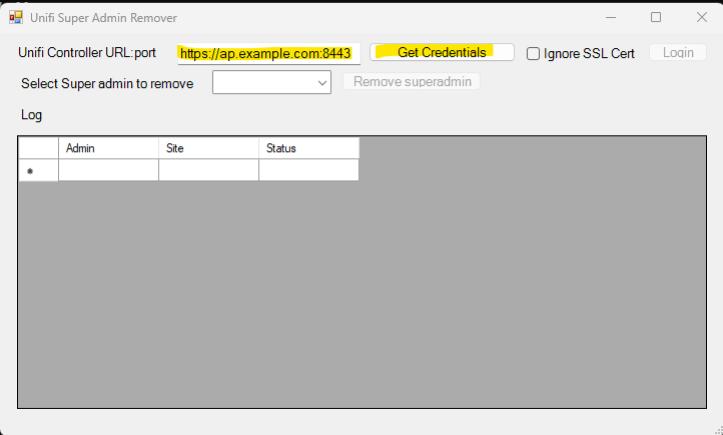
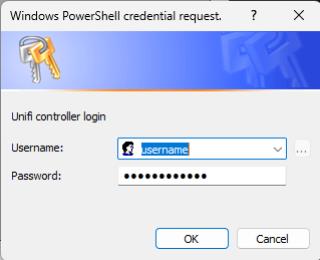
Enter in the admin credentials to access the Unify portal and press OK
Click the login button
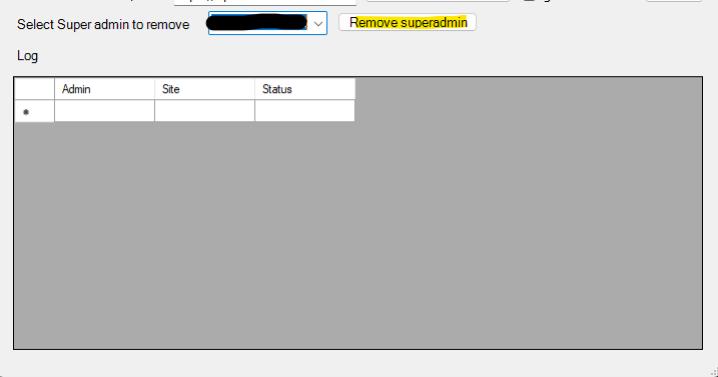
Select the user to remove and then click Remove superadmin