
When the Windows Update Database gets too large, here are some options to clean it up.
Option 1 - Use Windows Cleanup
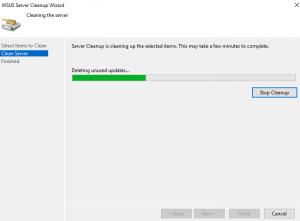
First run the WSUS Clean up Wizard by opening the Windows Update console, selecting options, and selecting the Server Cleanup Wizard.


Option 2 - Trim the Events table and cleanup
Create a file named truncateEvents.sql with the following SQL added. We used this before running the next option as we didn't have enough space on the drive.
USE SUSDB;
GO
truncate table tbEventInstance;
DBCC SHRINKDATABASE (SUSDB);
Execute the cleanup script
sqlcmd -S np:\\.\pipe\Microsoft##WID\tsql\query -E -i truncateEvents.sql

Option 3 - Using a WSUS Optimization Script
Reducing the size of the database
We found that the C:\Windows\WID\Data\SUSDB.mdf was 28GB in size, this is after a few years of use. Here is how to reduce the size.
Create a new file with the below scriptEnter in the following into the server box
sqlcmd -S np:\\.\pipe\Microsoft##WID\tsql\query -E -i truncate.sql

truncate.sql
/******************************************************************************
This sample T-SQL script performs basic maintenance tasks on SUSDB
1. Identifies indexes that are fragmented and defragments them. For certain
   tables, a fill-factor is set in order to improve insert performance.
   Based on MSDN sample at http://msdn2.microsoft.com/en-us/library/ms188917.aspx
   and tailored for SUSDB requirements
2. Updates potentially out-of-date table statistics.
******************************************************************************/

USE SUSDB;
GO
SET NOCOUNT ON;

-- Rebuild or reorganize indexes based on their fragmentation levels
DECLARE @work_to_do TABLE (
    objectid int
    , indexid int
    , pagedensity float
    , fragmentation float
    , numrows int
)

DECLARE @objectid int;
DECLARE @indexid int;
DECLARE @schemaname nvarchar(130);
DECLARE @objectname nvarchar(130);
DECLARE @indexname nvarchar(130);
DECLARE @numrows int
DECLARE @density float;
DECLARE @fragmentation float;
DECLARE @command nvarchar(4000);
DECLARE @fillfactorset bit
DECLARE @numpages int

-- Select indexes that need to be defragmented based on the following
-- * Page density is low
-- * External fragmentation is high in relation to index size
PRINT 'Estimating fragmentation: Begin. ' + convert(nvarchar, getdate(), 121)
INSERT @work_to_do
SELECT
    f.object_id
    , index_id
    , avg_page_space_used_in_percent
    , avg_fragmentation_in_percent
    , record_count
FROM
    sys.dm_db_index_physical_stats (DB_ID(), NULL, NULL , NULL, 'SAMPLED') AS f
WHERE
    (f.avg_page_space_used_in_percent < 85.0 and f.avg_page_space_used_in_percent/100.0 * page_count < page_count - 1)
    or (f.page_count > 50 and f.avg_fragmentation_in_percent > 15.0)
    or (f.page_count > 10 and f.avg_fragmentation_in_percent > 80.0)

PRINT 'Number of indexes to rebuild: ' + cast(@@ROWCOUNT as nvarchar(20))

PRINT 'Estimating fragmentation: End. ' + convert(nvarchar, getdate(), 121)

SELECT @numpages = sum(ps.used_page_count)
FROM
    @work_to_do AS fi
    INNER JOIN sys.indexes AS i ON fi.objectid = i.object_id and fi.indexid = i.index_id
    INNER JOIN sys.dm_db_partition_stats AS ps on i.object_id = ps.object_id and i.index_id = ps.index_id

-- Declare the cursor for the list of indexes to be processed.
DECLARE curIndexes CURSOR FOR SELECT * FROM @work_to_do

-- Open the cursor.
OPEN curIndexes

-- Loop through the indexes
WHILE (1=1)
BEGIN
    FETCH NEXT FROM curIndexes
    INTO @objectid, @indexid, @density, @fragmentation, @numrows;
    IF @@FETCH_STATUS < 0 BREAK;

    SELECT
        @objectname = QUOTENAME(o.name)
        , @schemaname = QUOTENAME(s.name)
    FROM
        sys.objects AS o
        INNER JOIN sys.schemas as s ON s.schema_id = o.schema_id
    WHERE
        o.object_id = @objectid;

    SELECT
        @indexname = QUOTENAME(name)
        , @fillfactorset = CASE fill_factor WHEN 0 THEN 0 ELSE 1 END
    FROM
        sys.indexes
    WHERE
        object_id = @objectid AND index_id = @indexid;

    IF ((@density BETWEEN 75.0 AND 85.0) AND @fillfactorset = 1) OR (@fragmentation < 30.0)
        SET @command = N'ALTER INDEX ' + @indexname + N' ON ' + @schemaname + N'.' + @objectname + N' REORGANIZE';
    ELSE IF @numrows >= 5000 AND @fillfactorset = 0
        SET @command = N'ALTER INDEX ' + @indexname + N' ON ' + @schemaname + N'.' + @objectname + N' REBUILD WITH (FILLFACTOR = 90)';
    ELSE
        SET @command = N'ALTER INDEX ' + @indexname + N' ON ' + @schemaname + N'.' + @objectname + N' REBUILD';
    PRINT convert(nvarchar, getdate(), 121) + N' Executing: ' + @command;
    EXEC (@command);
    PRINT convert(nvarchar, getdate(), 121) + N' Done.';
END

-- Close and deallocate the cursor.
CLOSE curIndexes;
DEALLOCATE curIndexes;


IF EXISTS (SELECT * FROM @work_to_do)
BEGIN
    PRINT 'Estimated number of pages in fragmented indexes: ' + cast(@numpages as nvarchar(20))
    SELECT @numpages = @numpages - sum(ps.used_page_count)
    FROM
        @work_to_do AS fi
        INNER JOIN sys.indexes AS i ON fi.objectid = i.object_id and fi.indexid = i.index_id
        INNER JOIN sys.dm_db_partition_stats AS ps on i.object_id = ps.object_id and i.index_id = ps.index_id

    PRINT 'Estimated number of pages freed: ' + cast(@numpages as nvarchar(20))
END
GO


--Update all statistics
PRINT 'Updating all statistics.' + convert(nvarchar, getdate(), 121)
EXEC sp_updatestats
PRINT 'Done updating statistics.' + convert(nvarchar, getdate(), 121)
GO
Option 4 - Remove Database
Another option is to remove WSUS the database completely and start again
# Remove the feature and restart server
Uninstall-WindowsFeature -Name UpdateServices,Windows-Internal-Database -Restart

# Remove files from
C:\Windows\WID\

# Install the feature again and restart
Install-WindowsFeature UpdateServices -Restart