Clean Exchange Server Logs
Created: 2020-06-03 21:19:31 | Last modified: 2020-07-10 03:00:44
Access: Read | Views: 229 | Rating: N/A | Tags: microsoft exchange
Instructions for how to clean the Exchange logs using power shell
Every now and again the Exchange server can create a large number of logs in the logs directory

Here is a PowerShell script which will clean these logs up automatically. This can be useful for when your C drive becomes full and back pressure is applied which stops email flow.
To run the script, copy the text from the box below into a file and name it CleanLogs.PS1
Then open Powershell and navigate to the directory where the script is located and execute it but running
.\CleanLogs.PS1
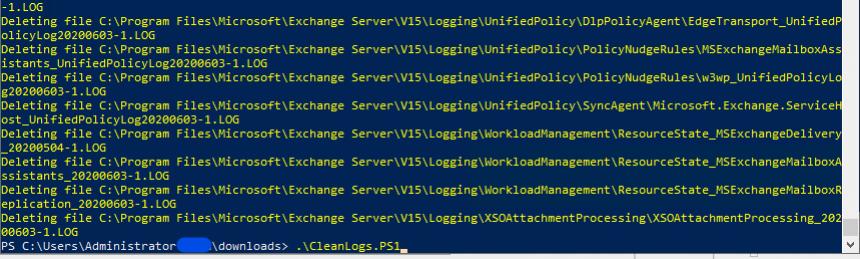
You will get the output of the log files being deleted.
CleanLogs.PS1
Set-Executionpolicy RemoteSigned
$days=0
$IISLogPath="C:\inetpub\logs\LogFiles\"
$ExchangeLoggingPath="C:\Program Files\Microsoft\Exchange Server\V15\Logging\"
$ETLLoggingPath="C:\Program Files\Microsoft\Exchange Server\V15\Bin\Search\Ceres\Diagnostics\ETLTraces\"
$ETLLoggingPath2="C:\Program Files\Microsoft\Exchange Server\V15\Bin\Search\Ceres\Diagnostics\Logs"
Function CleanLogfiles($TargetFolder)
{
  write-host -debug -ForegroundColor Yellow -BackgroundColor Cyan $TargetFolder

    if (Test-Path $TargetFolder) {
        $Now = Get-Date
        $LastWrite = $Now.AddDays(-$days)
    #   $Files = Get-ChildItem $TargetFolder -Include *.log,*.blg, *.etl -Recurse | Where {$_.LastWriteTime -le "$LastWrite"}
        $Files = Get-ChildItem "C:\Program Files\Microsoft\Exchange Server\V15\Logging\"  -Recurse | Where-Object {$_.Name -like "*.log" -or $_.Name -like "*.blg" -or $_.Name -like "*.etl"}  | where {$_.lastWriteTime -le "$lastwrite"} | Select-Object FullName
        foreach ($File in $Files)
            {
               $FullFileName = $File.FullName
               Write-Host "Deleting file $FullFileName" -ForegroundColor "yellow";
                Remove-Item $FullFileName -ErrorAction SilentlyContinue | out-null
            }
       }
Else {
    Write-Host "The folder $TargetFolder doesn't exist! Check the folder path!" -ForegroundColor "red"
    }
}
CleanLogfiles($IISLogPath)
CleanLogfiles($ExchangeLoggingPath)
CleanLogfiles($ETLLoggingPath)
CleanLogfiles($ETLLoggingPath2)
Notes
If you get the message "cannot be loaded because the execution of scripts is disabled on this system" you will need to enable the remote signed execution policy
Set-ExecutionPolicy RemoteSigned
When done, set back to the default settings (restricted)
Set-ExecutionPolicy Restricted

