Cisco LNS Setup
Created: 2021-02-11 21:04:30 | Last modified: 2021-07-08 21:46:23
Access: Read | Views: 260 | Rating: N/A | Tags:
How to setup a Cisco router as an LNS
We had a project where we needed to create multiple LNS (L2TP Network Server) for LAC (L2TP Access Concentrator) termination. This project was for an ISP to provide services from a wholesaler.
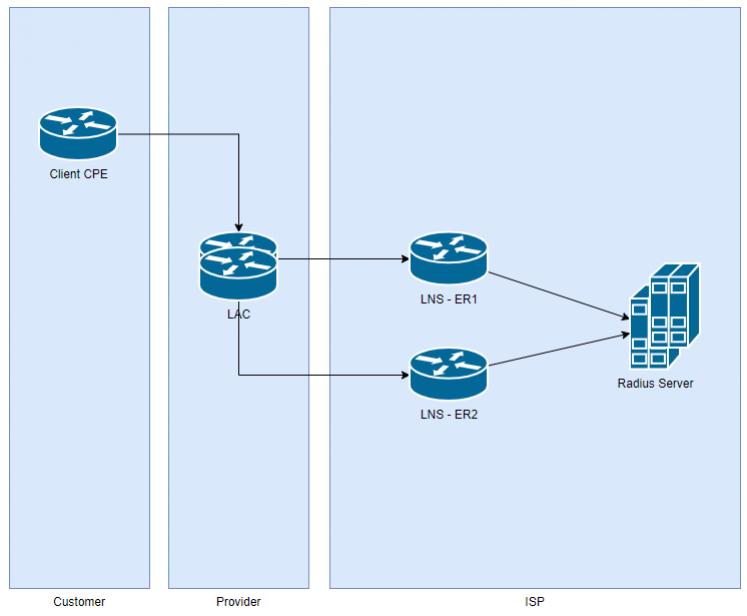
The way that it works is that the end user will create a PPP connection over ADSL (PPPoA), VDSL (PPPoE) or fiber (PPPoE) using a username of [email protected], the wholesaler LAC will create the L2TP tunnel to the LNS and the LNS will authenticate the connection with a Radius server. For this project we used multiple pieces of equipment, we used two identical Cisco ASR 1001-x routers and FreeRadius software for the authentication of the L2TP tunnels created by the CPE/LAC.
In the diagram below, the end user is the customer, provider is the wholesale provider and we are the ISP.
ER1
# The below config is for a Cisco 2700
# If using an ASR1001-X, sub interfaces must be enabled and ntp and qos can't be used. This can be tested as per the notes below
aaa policy interface-config allow-subinterface

interface Virtual-Template1
 no ntp disable
 no qos pre-classify
upgrade fpd auto
version 15.1
service timestamps debug datetime msec
service timestamps log datetime msec
no service password-encryption
!
hostname er1
!
boot-start-marker
boot-end-marker
!
!
vrf definition Mgmt-intf
 !
 address-family ipv4
 exit-address-family
 !
 address-family ipv6
 exit-address-family
!
aaa new-model
!
!
aaa group server radius ISP-RAD
 server name radius1
 ip radius source-interface Port-channel10.201
!
aaa authentication ppp default group ISP-RAD
aaa authorization network default group ISP-RAD
aaa accounting delay-start
aaa accounting update periodic 15
aaa accounting network default start-stop group ISP-RAD
aaa accounting connection default start-stop group ISP-RAD
aaa accounting system default start-stop group ISP-RAD
aaa policy interface-config allow-subinterface
!
!
!
!
!
aaa session-id common
!
clock timezone UTC 12 0
ip source-route
ip cef
!
!
!
!
!
ip flow-cache timeout active 1
ip name-server 8.8.8.8
no ipv6 cef
!
multilink bundle-name authenticated
vpdn enable
vpdn logging
vpdn logging local
!
vpdn-group Wholesale-Provider-CallPlus-W1
 description PPPoE from LAC for domain.com
 accept-dialin
  protocol l2tp
  virtual-template 1
 source-ip 111.111.111.111
 local name lns-er1
 lcp renegotiation on-mismatch
 l2tp tunnel password 0 tunnelpassword
 ip pmtu
!
!
!
!
!
!
!
!
crypto pki token default removal timeout 0
!
!
!
redundancy
!
!
!
!
!
bridge irb
!
!
!
!
bba-group pppoe global
 virtual-template 1
!
!
interface Port-channel10
 no ip address
 hold-queue 150 in
!
interface Port-channel10.105
 description NETWORK link
 encapsulation dot1Q 105
 ip address 222.222.222.222 255.255.255.224
 ip flow ingress
 ip flow egress
!
interface Port-channel10.201
 description RADIUS link
 encapsulation dot1Q 201
 ip address 111.111.111.111 255.255.255.248
!
interface GigabitEthernet0/1
 description HANDOVER link
 mtu 9216
 no ip address
 duplex full
 speed 1000
 media-type rj45
 no negotiation auto
!
interface GigabitEthernet0/1.80
 description link to LAC
 encapsulation dot1Q 80
 ip address 333.333.333.333 255.255.255.252
!
interface GigabitEthernet0/2
 description Link to RADIUS and NETWORK
 no ip address
 duplex auto
 speed auto
 media-type rj45
 no negotiation auto
 channel-group 10
 no cdp enable
!
interface GigabitEthernet0/3
 description Link to RADIUS and NETWORK
 no ip address
 duplex auto
 speed auto
 media-type rj45
 no negotiation auto
 channel-group 10
 no cdp enable
!
interface Virtual-Template1
 no ip address
 no ip redirects
 no ip proxy-arp
 ip verify unicast reverse-path
 no logging event link-status
 no peer default ip address
 ntp disable
 qos pre-classify
 keepalive 20 3
 ppp mtu adaptive
 ppp authentication pap chap callin
 ppp ipcp ignore-map
 ppp multilink
 ppp timeout authentication 100
!
ip forward-protocol nd
no ip http server
no ip http secure-server
!
ip route 0.0.0.0 0.0.0.0 222.222.222.1
!
radius server radius1
 address ipv4 111.111.111.112 auth-port 1812 acct-port 1813
 key THEKEYVALUE
!
!
control-plane
!
bridge 85 protocol ieee
bridge 85 route ip
!
!
mgcp profile default
!
!
!
gatekeeper
 shutdown
!
!
line con 0
 stopbits 1
line aux 0
 stopbits 1
line vty 0 4
 session-timeout 3500
 access-class 11 in vrf-also
 exec-timeout 0 0
 transport input all
!
ntp update-calendar
ntp server ntpserver
end
Radius Server
The Radius server was created on a Linux server and we used FreeRadius.
Install FreeRadius
yum install freeradius
service radiusd start
Edit the following configs
/etc/raddb/clients.conf
#################################
# Radius Setup
#
# ER1 Client
client 111.111.111.111 {
  require_message_authenticator = no
  secret = theradiuspasswordkey
  shortname = lns
  nastype = cisco
}

# ER2 Client
client 111.111.222.111 {
 require_message_authenticator = no
 secret = theradiuspasswordkey
 shortname = lns
 nastype = cisco
}
/etc/raddb/users
################################
# Test Users on Radius for authentication
#
[email protected] Cleartext-Password := "thetestingpassword"
        Service-Type = Framed-User,
        Framed-Protocol = PPP,
        Framed-MTU = 1500,
        Framed-IP-Address = 444.444.444.444,
        Framed-IP-Netmask = 255.255.255.255,
        MS-Primary-DNS-Server = 8.8.8.8,
        Session-Timeout = 0,
        Idle-Timeout = 300,
        Cisco-AVPair = "lcp:interface-config=ip unnumbered GigabitEthernet0/2.105"
You can later use SQL for authentication look up (This isn't covered in this article)
Testing
Following commands can be used to test your LAC configuration and authentication
# Command to check that sub interfaces can be used using a virtual Template (Virutal-Template 1 in this example)
test Virtual-Template 1 subinterface

# Test Radius Server from Cisco router
test aaa gr ISP-RAD [email protected] thepassword new-code

# Test from Radius server
radtest [email protected] thepassword localhost 10 testing123

# Debug radius server, debug information is present to console
service radiusd stop
radiusd -X

# Debug cisco radius on Cisco router
debug radius
debug radius authentication

# Show all L2TP Sessions
sh l2tp sessions

# Show session info for radius
sh int virtual-access 19

# View Radius Attempts from RAS
service radiusd stop
radiusd -X

# Logs Directory for RAD - Use for checking user logins/fails
/var/log/radius/radacct/111.111.111.111/

# Clear PPP session
sh l2tp session
6389       12651      50584      user@domain..., Vi5 est    00:00:40 336er1#
clear interface virtual-access 5

# Clear a single tunnel
sh l2tp tun
clear vpdn tunnel l2tp id 111

# Clear all l2tp tunnels
clear vpdn tunnel l2tp all